.svg)
.svg)

.jpg)
.png)
.png)

.svg)
We first encountered Rain Cards back in 2022, when I was a crypto accountant for dOrg (the first DAO to be incorporated as an LLC in the US) and struggling to pay our fiat bills. dOrg ran completely on-chain, meaning our customers paid our invoices in stablecoins and then we paid our contractors in USDC. In a vacuum, this system works great - but dOrg was still an LLC that had to operate within the confines of the normal banking world. Before we found Rain Cards, dOrg members were charging fiat expenses (i.e. taxes, cloud costs, software costs) to their personal credit cards and then getting reimbursed in stablecoins at month-end. It was inefficient, risky and created an accounting headache on my end when trying to split out all the contractor reimbursements.
Enter Rain Cards! Rain makes it seamless for companies to use stablecoins in the real world. Their main offering is a crypto credit card where you fund it with stablecoins and use it to pay for fiat transactions. It seems like a no-brainer, but we haven’t found any other solutions on the market that are just as easy and inexpensive. When we were reconciling Rain Cards for dOrg, I remember always being slightly off on the credit card balance every month (i.e. QBO didn’t tie to the ending balance on Rain’s dashboard). I chalked the variance up to rounding and timing because the difference was slight, but it always bothered me. However, as most seasoned accountants know, some “immaterial” battles are not worth fighting and energy is better spent tackling bigger and more pertinent problems.
Rain came back into our accounting sphere when we onboarded a new customer recently, another DAO. They are also fully crypto-native, so Rain is their vital bridge between stablecoin land and the realm of the fiat warriors. We hadn’t worked with dOrg in a while, so when we logged into Rain again, we were surprised by the fresh look and feel of Rain Cards. The core functionality is the same (i.e. crypto credit card), but the dashboard and features were definitely elevated compared to the 2022/2023 era. And we finally cracked the code on how reconciling Rain cards works! In this article, we’re going to dive into an example reconciliation so you know how to tie out your Rain card to the penny.
But first, let’s explain the core concept behind this reconciliation: there are two accounts you need to reconcile on Rain Cards, the credit card liability and the stablecoin collateral (asset). The normal flow is:
- Customer deposits stablecoins as collateral into a dedicated on-chain smart contract
- Customer then uses the card to pay for various fiat transactions (i.e. Google, Netlify, Anthropic, Perplexity, Intuit, etc)
- The card balance is periodically paid off by withdrawing from the stablecoin collateral
- Rain also has a bill pay feature, so whenever bills are paid, the collateral balance decreases as well
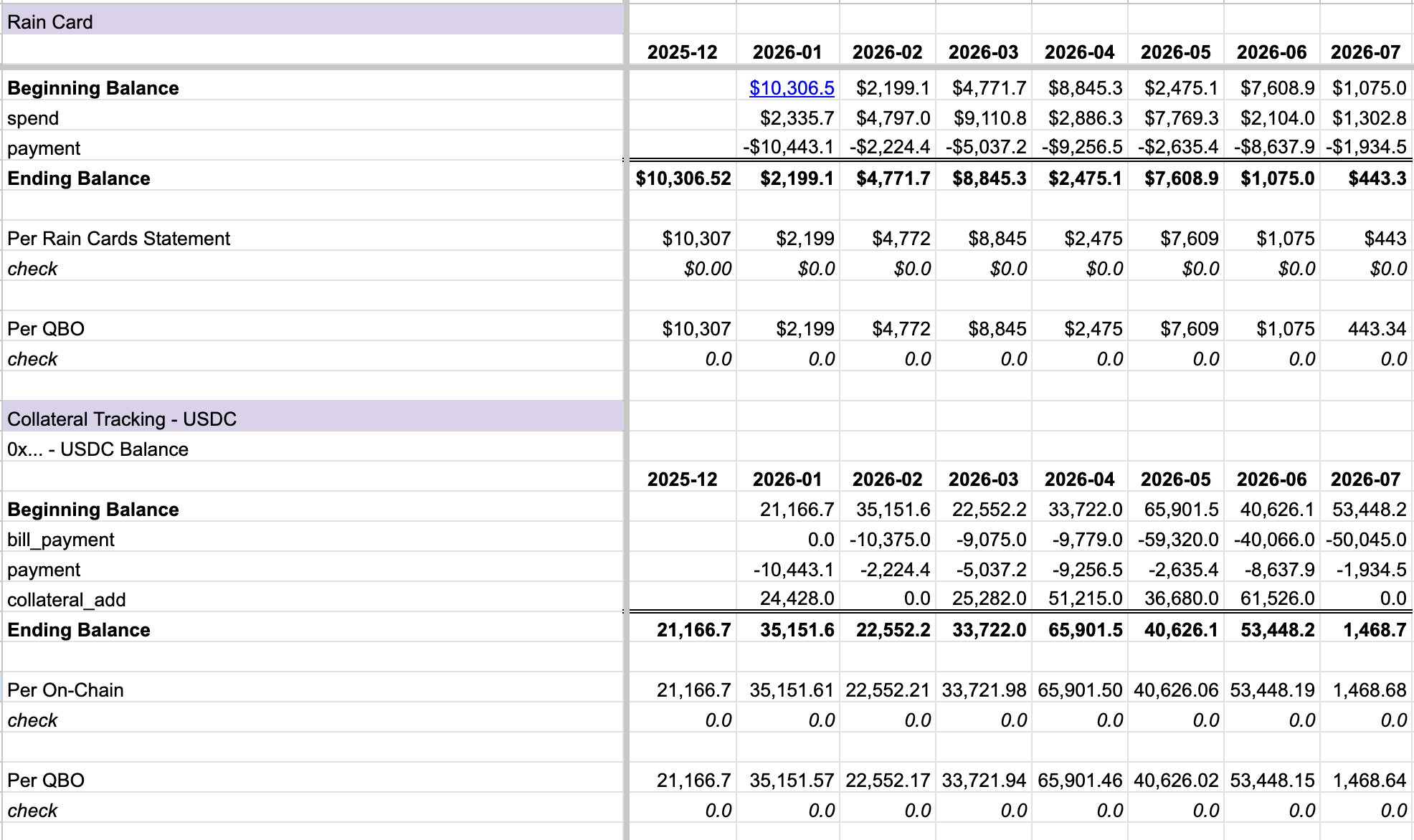
This dual-account realization changed the game for me, and I finally understood how the reconciliation was supposed to work. With this theory in mind, let’s look at an example spreadsheet:
First, paste in all your Rain Card transactions into a separate tab (dashboard → recent transactions → export csv → standard csv). There are four main transaction types:
- Collateral_add → increase in your Rain Cards collateral balance (this is an internal transfer on-chain from your wallet into the Rain smart contract)
- Spend → credit card charge
- Payment → credit card balance is paid by liquidating your collateral
- Bill_payment → bill pay feature, paid using collateral
The last step in the transactions tab is add a column for “Month” so the Summary tab splits the data by period:

The Summary tab is where all the magic happens; we split the reconciliation by the credit card liability and the stablecoin assets. Let’s tackle the credit card liability first.
Beginning balance + spend - payment = Ending credit card liability
We don’t mess with adding collateral or bill pay to the credit card; those transaction types don’t affect the ending liability balance. It’s simple to tie out the month-end balance because it should match the credit card statement provided by Rain at month-end. My reconciliations always function as a three-way match - I’m comparing my spreadsheet data to Quickbooks and Rain, ensuring all three numbers tie.
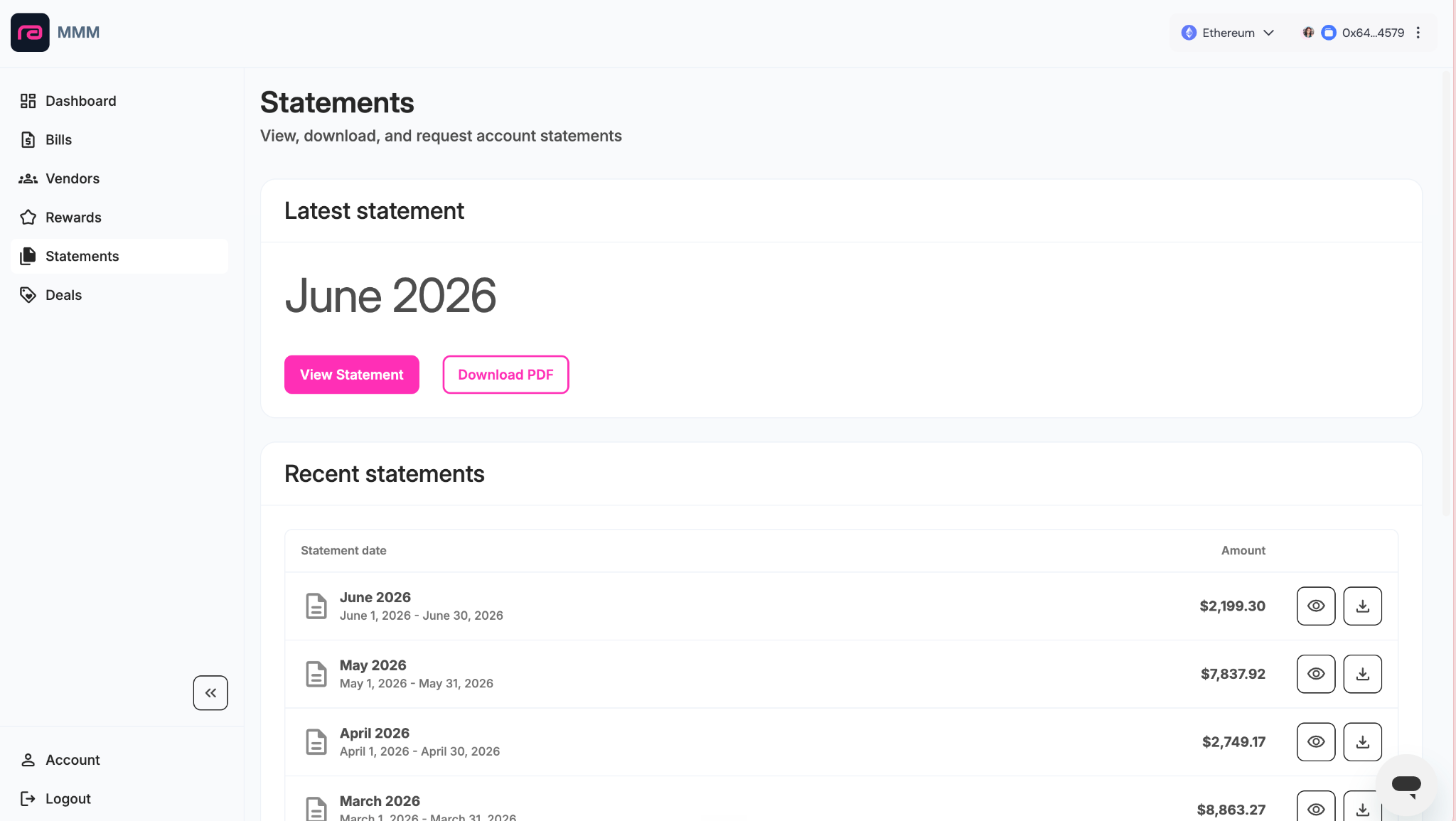
We tabulate a similar summary for the stablecoin collateral balance (an asset on your balance sheet).
Beginning balance - bill payments - credit card payments + collateral additions = ending balance
In terms of crypto accounting, there’s a few ways to go about this. You could add the Rain collateral contract to your crypto subledger and book the transactions that way. Alternatively, you could leave the smart contract out of the subledger and do the accounting through transfers/bills/expenses directly in the QBO asset account. It doesn’t really matter because your crypto subledger is likely on a “by wallet” cost basis methodology and we’re dealing with stablecoins here, so realized gain/loss is negligible. However, I usually opt for method #2 because it’s cleaner to upload supporting documentation to individual bills and expenses in QBO (instead of via a lumpsum journal entry). It’s also better for making sure bills are entered in the correct period (my client often pays bills the month after services are rendered, so I need to add the accrual into QBO first).
The beauty of the smart contract architecture is that it’s easy to verify the stablecoin collateral at month-end as well. Just use Etherscan’s token balance checker, pop in the smart contract address, USDC’s token contract address (0xA0b86991c6218b36c1d19D4a2e9Eb0cE3606eB48), the month-end date and there you go - instant verification. The only tricky part is timing differences. Etherscan reports on UTC time and Rain Cards timing may be different, so if your reconciliation isn't tying out, check if there are any transactions straddling the cut-off date. You may need to filter the balance check report by block number, using the block # from the latest transaction that Rain Cards is reporting for the month. For audit purposes, I take a snapshot of Etherscan’s balance checker and link it to the “Per On-Chain” field in the rec (I love three-way matches with ample support!)
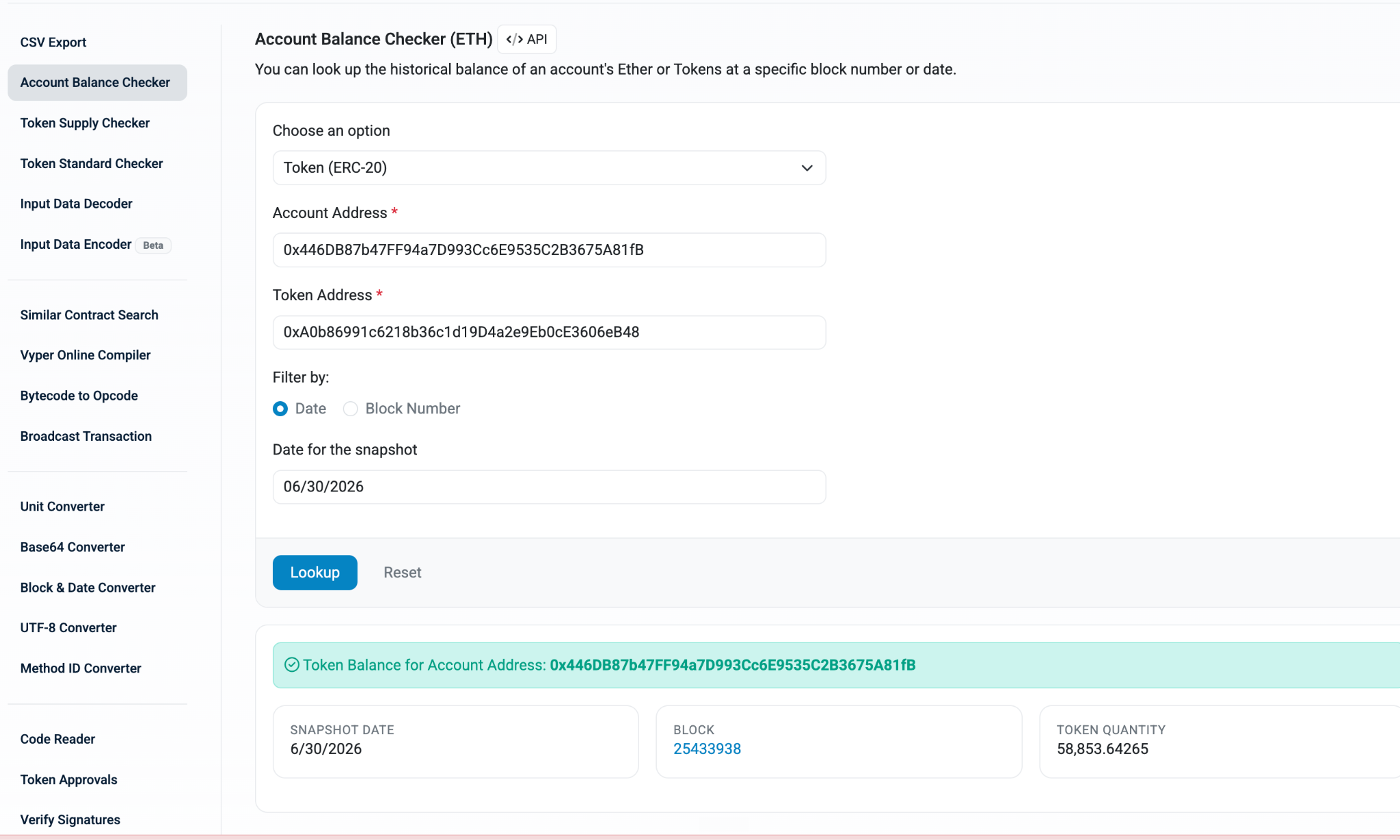
And there you have it! Feel free to make a copy of our example reconciliation and adapt it to your needs and Rain Cards data. I appreciate Rain’s dual account structure and how elegant their architecture is, especially in terms of always having something to reconcile to (whether it’s a platform-generated statement or on-chain data). Happy reconciling!

.svg)

.svg)

