.svg)
.svg)

.jpg)
.png)
.png)

.svg)
An Accountant Moonlights as a Software Engineer
I’ve been tinkering a lot these days with AI tools, in case you couldn’t tell by my incessant, dorky LinkedIn posts. After The Onchain Finance Institute hosted their inaugural accounting hackathon (and I won third place!), I've been obsessed with building mini apps with Perplexity Computer. Crypto accounting is the perfect field to test out these shiny new products. The most difficult part of crypto accounting is grabbing on-chain data, reconciling it and uploading it into the crypto subledger (assuming the subledger doesn’t natively sync in your data). My customers are still gallivanting across several obscure networks, which means my job is still as involved and sleuthy as ever. It seems most enterprise subledgers have converged on supporting the top 10-15 blockchains (like Ethereum, Bitcoin and Solana), but again, my clients go where the opportunity is. Chains like Hyperliquid, Zero Gravity, and Babylon are new but lucrative, so the accounting has to be spot-on.
So for the month of May, I ideated, built and shipped five new mini apps that directly improved my crypto accounting workflows. This article will review the app functionality, the building process and the biggest takeaways. TL;DR, it’s incredibly easy to tinker these days, and it’s empowering to finally be able to solve my biggest headache at work. I don’t have to wait on a data science team or pay money to some sketchy company. I can brain dump an idea into Perplexity and have my agents get to work.
A quick note on Perplexity Computer - I used this tool instead of Claude Co-work for a few reasons:
- With Perplexity, you have access to both GPT-5 and Opus (Perplexity doesn’t produce their own models - they’re an orchestrator on top)
- I’m able to publish my apps on a dedicated, public URL
- I’ve already loaded skills into Perplexity and it has access to all of my past queries…so the more I use this tool, the better and more intuitive it gets
- My husband is a founding engineer at Perplexity 🙂
Let’s build!
Canton Explorer
The existing Canton explorer, Cantonscan, charges $100 for the “Export as CSV” button on the transfers page, so I decided to build my own lightweight explorer. 🫠 The underlying data is already public on the Canton Network, so we made this information free and accessible to all. I needed to download Canton data because Koinly (a subledger one of my Canton customers is on) isn’t a supported network yet - so instead of waiting for my client to pull their custodian logs, we used this tool to download all transfers and upload them into Koinly. My prompt went something like this:
I need your help creating an app that automatically downloads data from Cantonscan - when you go to an account address page (example here) and click on transfers, then "export as csv", they charge you $100 for downloading data. I want to build an application where a user can input the address they're desiring data for, and then you return the data in a csv (the user should be able to filter by date). Just scrape all the data from Cantonscan, you don't need to pull from external databases.
When I was building this tool, I had no clue about the power of APIs, so I naively told Perplexity to just “scrape” Cantonscan (which means copying data directly from the website). Thank goodness Perplexity ignored me and searched for an API anyway. I asked the AI how it found this specific API, and it replied, “I opened the real Cantonscan site in an automated browser and watched what requests its own frontend was making — then peeled those off and called them directly.”
🎤🤯
So that begs the question, what’s the point of paying for anything if there’s a free API underneath the website? Perplexity was so stellar at reverse-engineering a website, testing its own solutions and deploying a new application. The end-to-end process took about thirty minutes, mostly because I had design tweaks like updating the copy, colors, creating an FAQ section, etc. The core logic was finished much earlier and was basically a “one-shot,” meaning it only took one prompt to get it correct.
After completing this first app, I realized the crypto accounting world was my oyster. I wasn’t limited anymore; I could create anything my mind desired. I used to say that accountants doubled as researchers and programmers. I still think the research-mindset is applicable (even more so), but being a programmer is a moot point now. We literally have assistants that are world-class programmers in our back pockets now, so there’s no use in trying to learn Javascript or Python for yourself. Congratulations accountants, we all just massively leveled up.
WISP Workshop
https://wisp-workshop.pplx.app/
The idea for this website was born because I wanted to improve our own security practices here at Hash Basis. I received a notification from the IRS about having a WISP (A Written Information Security Program, required by all paid tax preparers), and while we had one in our google drive, it was stale and lackluster. I brain-dumped all my existing security practices, tech stack and contractor/employee situation into Perplexity and asked it to come up with recommendations to make the security in our firm better. Perplexity asked a series of follow up questions such as:
- How do your contractors access client data — on their personal devices or firm-provided devices?
- What types of sensitive client data do you actually handle? (multi-select)
- Which written agreements do you currently have in place with contractors?
- On backups and MFA beyond Google — which of these apply?
After I entered my responses, the AI spent some time researching the regulatory frameworks governing the WISP, including IRS Publication 4557 and FTC Safeguards Rule. It then provided a detailed checklist indicating security practices I should implement, ranging from urgent to low priority. The checklist and generated WISP were extremely thorough - much better than any crusty templates or recommendations the IRS provides on their website. Perplexity gave actionable steps, a list of trusted vendors to use and defined confusing concepts like “EDR” and “Encrypted SSD.” I felt like such a space-age punk; it almost made me think security was cool.
“Security” can be such a scary and nebulous topic, especially for a small accounting firm owner with no formal background or training in security. After realizing how user-friendly Perplexity’s checklist was, I decided to build a front-end around it, including a security quiz that turns into a fully-formed WISP that complies with all relevant standards. There’s also a built-in checklist that can be downloaded as a CSV (progress can also be monitored directly in-app).
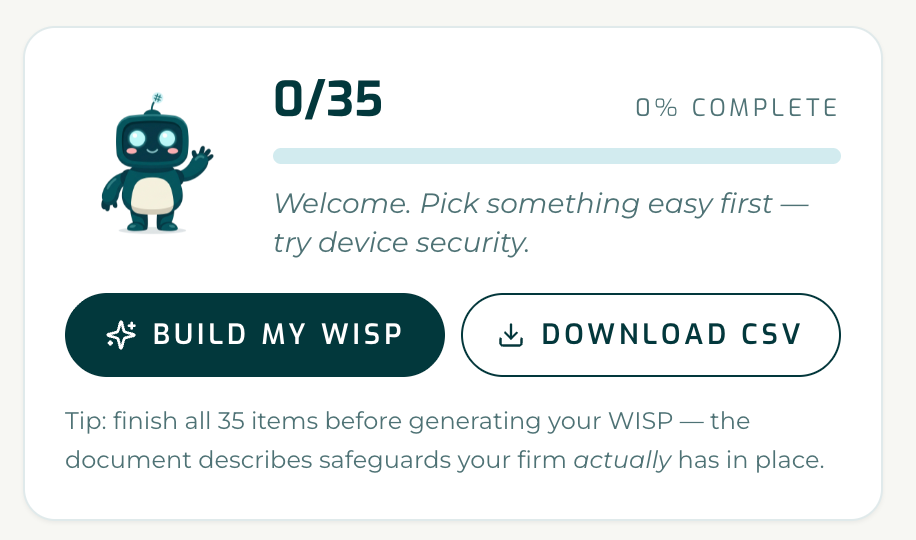
And since Perplexity already had my brand guidelines from the Canton export, the UI turned out so cute and welcoming. It even created a “security mascot”, Cipher!

The hardest part about building WISP Workshop was getting the user flow correct. In the first version, the delineation between the checklist/security quiz/WISP was confusing, and I wasn’t clear on where the user should start. Then I suggested not being able to create a WISP until all the checklist items were crossed off - which wasn’t ideal either because the checklist is 35+ items (too restrictive). I settled on a compromise of being able to create a WISP without completing all the items, but there’s a strong caveat to actually follow through on everything.
This app is specifically for solo or small accounting firms that don’t have the resources to hire a security or legal team to figure all this jargon out. With the advent of AI, it sort of makes those people obsolete, at least for the little fish like me.
Jupiter DCA Fills
This app was the most technically challenging one to build, and Perplexity had to iterate several times to get it right (it kept tripping up on itself!). To be honest, the app can be faulty at times, but it gets the job done eventually after I point out the bugs. Again, I had to create my own tool because of a pressing accounting issue that came up during one month-end close. For context, Jupiter is a DEX (decentralized exchange) on Solana, and they can execute simple spot trades and DCA trades. DCA stands for “dollar cost average”, which means you can trade a chunk of tokens over time, according to when certain pricing targets are hit. So instead of trading 200 SOL into USDC all at once, you deposit 200 SOL into a Jupiter trading contract, and the SOL is traded over a period of hours to days (assuming the pricing is within your parameters). This reduces pricing risk and volatility.
The issue is that Jupiter upgraded their DCA contracts from v1 to a v2 version in mid April 2026. Here’s a v1 versus v2 comparison:
Jupiter v2 essentially obfuscates DCA trades and makes it harder for bots to front-run the transactions/profit from them. See more from Jupiter’s official X account here:
On the subledger side, my client was using Koinly and the v2 upgrade “broke” their Solana syncer. Their existing software connected with a DCA v1 API which transparently exposed all the trades and pulled them in correctly. But with the v2 upgrade, I could only see the token outflows, not the actual trades. Perplexity built an initial app, but I quickly realized it was only pulling in v1 DCA trades as well. Opus and I went back & forth, and it kept gaslighting me when I said their v2 logic was breaking (I was testing on an address I knew had both trade types within the same period).
Apparently, there was no v2 API yet, so Perplexity had to cook up a workaround: “v2 has no public API yet, so we rebuild fills from raw on-chain data. The trick is that v2 doesn't put your trades on your wallet — it splits them across throwaway escrow accounts.”
This significantly increased the complexity, so I was prompted to get a free API key from Helius, a Solana RPC data provider. Because of Helius, Perplexity could easily call gettransactions() and back into the trades that way, instead of scraping Solscan directly.
Once the logic was correct, I tinkered around with the UI and user flow. To make it less confusing, the default setting is on “Auto”, meaning that Perplexity tries the v2 architecture first and if nothing returns, it falls back to the v1 path. Users can search trades by wallet address or deposit transaction hash (although the deposit hash only works for v1) and once the date range is selected, all trades are shown in-line and can be downloaded as well.
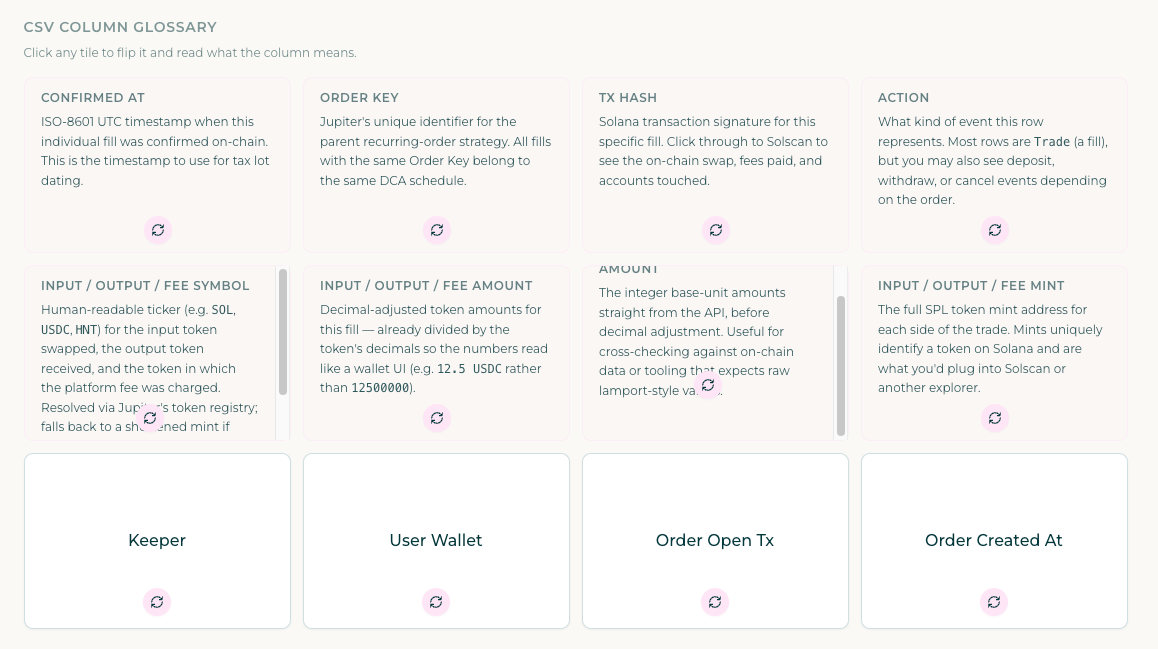
On the Koinly side, I eventually figured out an easier workaround - I just needed to input the “throwaway escrow account” as a separate Solana wallet, and the deposit part of the trade synced in automatically (although I still have to manually combine both sides into a trade). So I mainly use jupiterdca.pplx.app to double check my work and ensure ending contract balances are correct.
Babylon Staking Rewards
https://babylonfinality.pplx.app/#/
This app was a piece of cake compared to the Jupiter one. One of my clients is on the Babylon blockchain, and they operate a Finality Provider (FP for short, similar to a validator). Babylon is a Cosmos SDK-based blockchain, meaning rewards accrue to the validator/finality provider and must be claimed to become liquid. Before building this app, I used the Nodes Guru block explorer to grab the total accrued rewards balance at month-end. The difference between the cumulative balance each period was my monthly revenue. And then, the block explorer randomly stopped working! Shocker! Explorers are finicky, but instead of despairing, I realized I could just build my own tool.
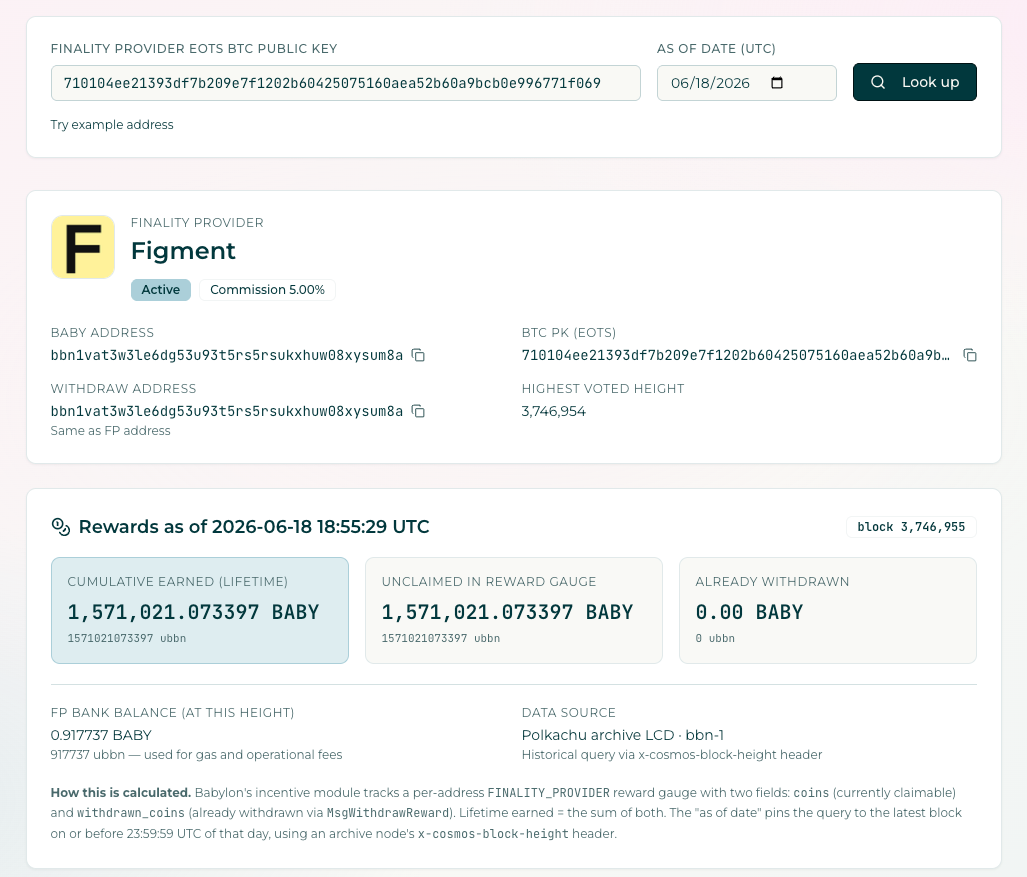
My client gave me a REST API that returned rewards data, so once I had that, I told Perplexity to create a snappy front-end around it. Now, all the user needs to do is input the FP BTC PK address and rewards data like cumulative rewards earned, unclaimed rewards and withdrawn rewards show up within a few seconds. I even programmed the app to pull in a picture of the FP, if one is available on Mintscan (you can see the full list of Finality Providers here: https://www.mintscan.io/babylon/finality-providers).
Once again, a free, public API saved the day. 🫡
Polkadot Rewards
https://dotrewards.pplx.app/#/
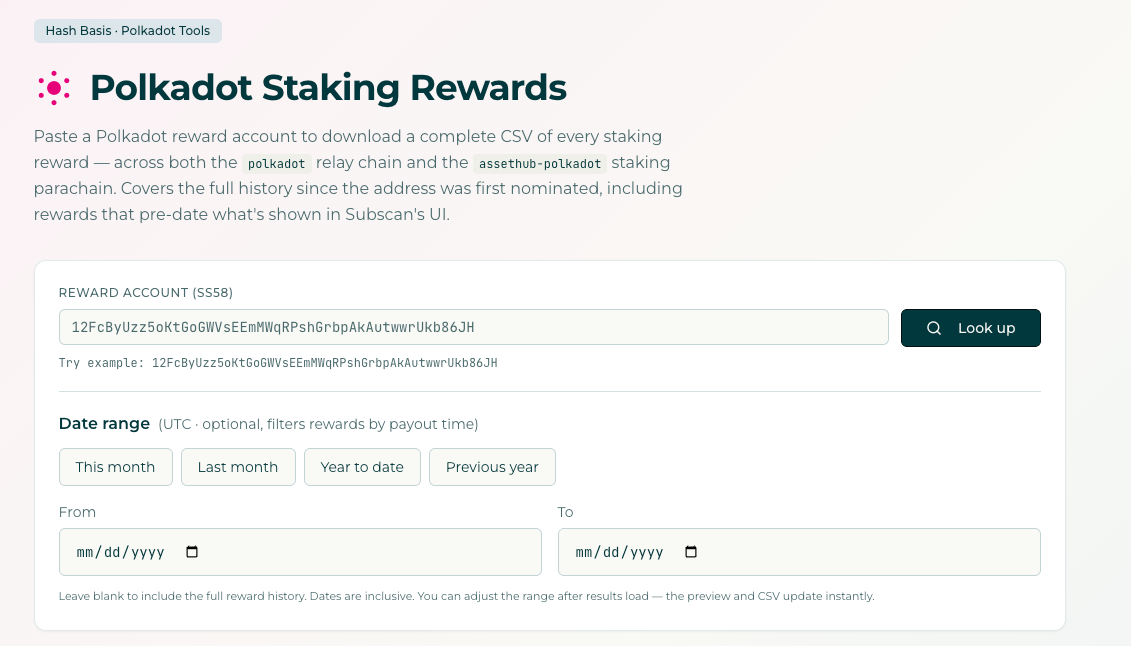
Although Polkadot has a somewhat functional block explorer (Subscan), I’m not able to pull the full staking rewards history for a delegator address (the rewards only go back a few months). My Perplexity prompt was laughably simple:
Is there a Polkadot API that will let me pull all the rewards data for a particular address? For example, I want all the Rewards data that appears on this explorer link here.
The issue is I think this explorer only goes back so far - for example, the earlier data on the explorer is Nov 2025 but I know there were rewards as early as May 2025.
I simply defined my ideal outcome, and the agents gladly got to work. I had to get a free API key from Subscan, but after pasting in the key, Perplexity built this custom app in no time. Also, the great part about building these apps in one tool is that it remembers my visual preferences, such as the Hash Basis font/colors/logo, the light gradient from blue to pink and the glow of the date-range buttons.
On-Chain Check
https://onchaincheck.pplx.app/#/
This tool is my magnum opus! My process was more involved with On-Chain Check because I actually uploaded a design spec as a markdown file. I had been thinking about this tool for a while, mostly because checking ending balances across multiple chains, assets, and customers is a nuisance - and after all, everything boils down to an API right? My high-level goal for this app was “to paste in a wallet address and have the balance checker work across multiple blockchains. After the balance is confirmed, a screenshot or audit log is saved that confirms this ending balance.”
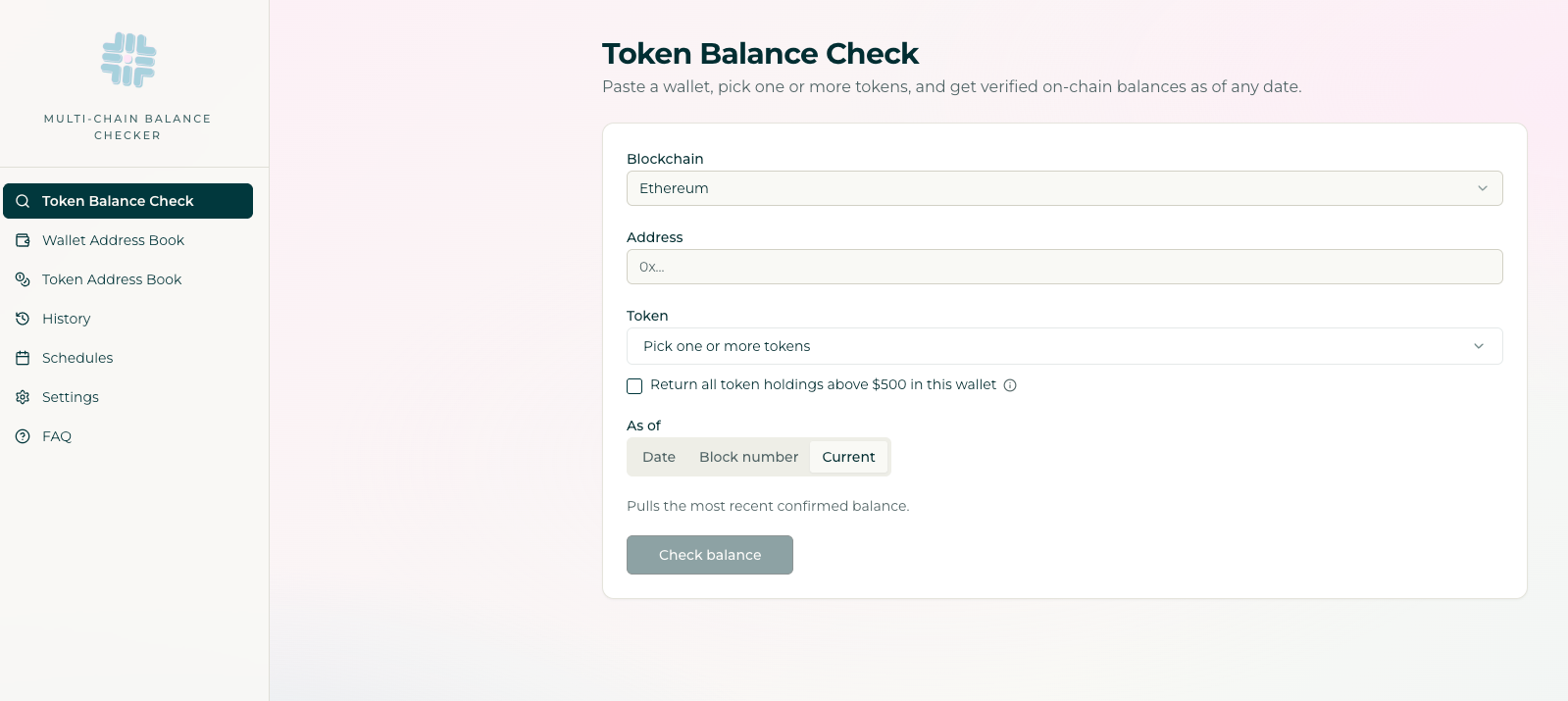
After multiple back & forths and design sprints, I can confidently say this tool has become integral in my month-end closes. Here are some of the coolest features:
- Token balances can be checked across several blockchains, including Ethereum, Base, Arbitrum, Optimism, Polygon, BSC, Celo, Avalanche, Solana and Bitcoin (the most popular blockchains for my customers)
- Users can enter custom token contracts to check - and then this token is automatically saved for next time
- Instead of picking individual tokens, users can choose to return any token balance >$500 on a certain day (this threshold is configurable as well)
- Balances can be checked by date or block number
- You can save a PNG screenshot that proves the wallet balance. This screenshot also has a user-friendly name that includes the blockchain and wallet address for easy identification
On-Chain Check also has the ability to do scheduled checks. You can select a wallet address and token to check at a predetermined cadence (i.e weekly, monthly, quarterly or yearly), which triggers a scheduled run in Perplexity. Balance checks are a critical part of our month-end process, which I’ve now automated. 🤩 However, there are a few kinks that I’m still ironing out:
- Any time I update the app, it erases all the scheduled runs (boo)
- Some of the APIs are faulty, especially Arbitrum and Optimism (which I think is an issue on the API’s side, not Perplexity)
- I wanted to make this a fully self-serve tool that multiple people could use with logins, but that requires a back-end database. That was beyond the scope of my vibe coding skills, so I chose to keep the app private for now. I believe Opus or GPT-5 could build this, but they’d need some assistance from someone who actually knows how to program.
Even with these drawbacks, using On-Chain Check is a big improvement from my previous process of opening up several block explorer tabs, feverishly looking up token contract addresses and organizing messy screenshots. It feels like I’ve created a beautiful Frankenstein, a creature that’s completely my own.
Looking Forward to the Future
The possibilities of AI are truly mind-blowing, overwhelming, exciting and nerve-wracking. Setting aside the concerns of AI safety, I’m shocked at how quickly this technology has upended my daily work - for the better though. Accounting can be a tedious field, but we finally have assistants that never tire or get salty, even when we ask them to make minute edits for the umpteenth time. I’m looking forward to this summer, when our workload at the firm is less and I can focus on learning/implementing this technology…and of course, building new apps!

.svg)

.svg)

